
What is the degree progress and where can I find it?
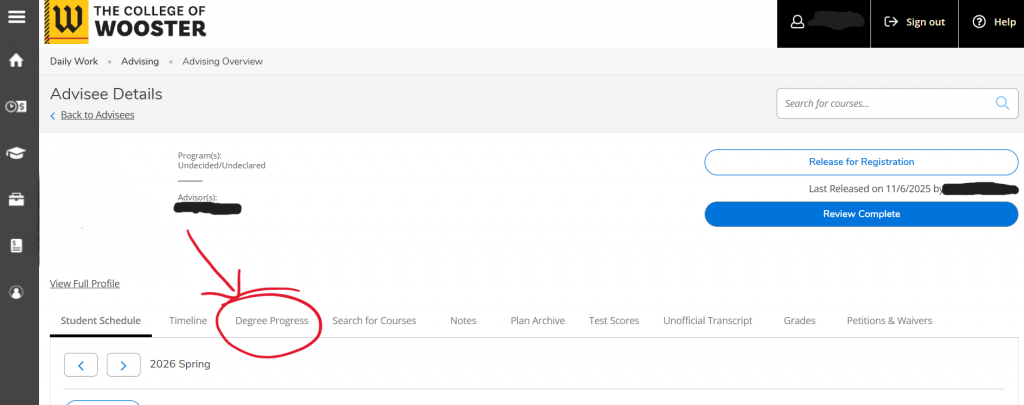
A degree progress is a report of the student’s progression towards graduation. Your degree progress should help you and your advisor track your progress towards degree completion. You can find your degree progress in self-service on the navigation bar below your information.
Why should I look at my degree progress and how often?
- Review your degree progress every semester with your academic advisor to ensure that you are on track to graduate.
- Check each semester that your courses are fulfilling the requirements per the academic catalogue and your preference (if you have more than one course that fulfills a requirement).
- Review your credits to graduate
- GPA and Major GPA
- Ensure that your information is correct for majors, minors, and pathways
- Key Features/Functions in your Degree Progress
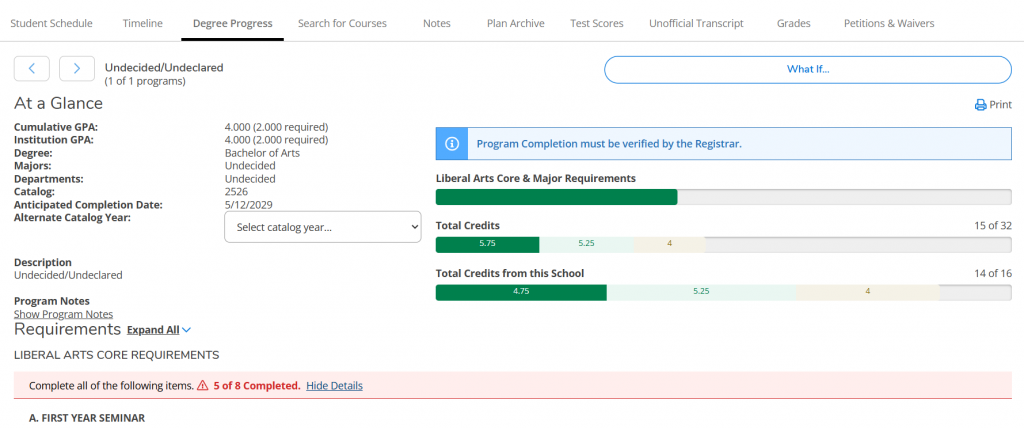
- “What If” function in degree progress can be utilized to view how different majors/minors would fit with your completed coursework before declaring or changing a major/minor.
- GPA: Cumulative and institutional GPA is your Grade Point Average
- Degree title is listed in the “At a Glance” section
- Majors are also listed in this section; if you haven’t declared a major, it will show as “undecided”
- Departments will show you which department you also fall in with your major(s)
- Catalog is the admit year for your program
- this is your admittance year into the college (when you started)
- Anticipated Completion Date is the date when you are anticipated for degree completion but is not your graduation date which will be the same as the date of Commencement
- Alternate Catalog Year means that you can use a different catalog year than the one listed for “Catalog” to view the new catalog requirements for your major/minor programs if you choose.
What do I do if my degree progress looks incorrect?
- Contact our office via email registrar@wooster.edu or stop by our office with your Student ID and we can look into the issue.
- If you have taken an alternate course approved by your advisor, please reach out to the department chair to request that a substitution be submitted to the Registrar’s Office via registrar@wooster.edu.
- Transfer credit will automatically apply as general elective credits toward graduation. This means that your transfer credits will pull under the “Other Courses” section of your degree progress if you haven’t filled out the Transfer Credit to Wooster form and followed that process to apply it as a Wooster course equivalency. You can find out more information on this process here.
- Additionally, if you find that a course is pulling for a requirement but you want to have it pull for a different requirement, you can stop by our office to make this change in your degree progress.
Degree Requirements
- You can view the degree requirements for the following on this website: Bachelor of Arts (B.A.), Bachelor of Music (B.M.) and Bachelor of Music Education (B.M.E.).
- Another way to view degree requirements is to visit the academic catalogue for your admit year.