
What can we help you with?
Record Release in Self-Service for Students
Colleague Self-Service
Granting Access to Records
The Family Educational Rights and Privacy Act (FERPA) is a federal law that protects the privacy of student education records and gives students and parents specific rights regarding access and control over those records. If you would like your parents or other people to be able to discuss certain aspects of your education with offices on campus, you must explicitly grant them permission.
Follow the steps below to grant the College permission to discuss your education with other people.
- Log in to Colleague Self‑Service using your student credentials.
- Select Student Records Release from the User Options menu at the left side of the screen.
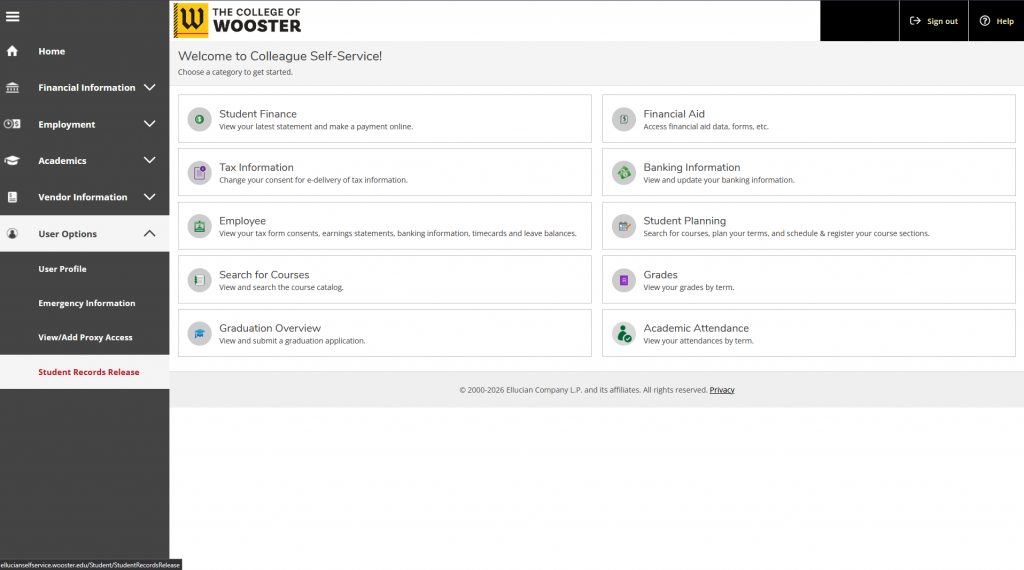
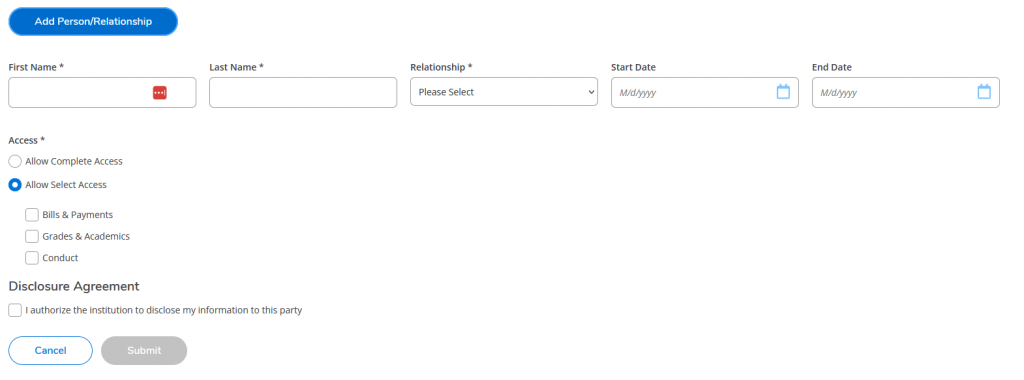
- Add a new authorization by clicking the Add Person / Relationship button. Provide the first and last name of the person to whom you are granting access. Select the person’s relationship to you from the drop-down menu. If you wish to specify start and end dates for the access, you may also enter them here. In the access section, you may choose either to Allow Complete Access or you may select individual areas that you wish to allow. Check the box to authorize the entries you have made and click submit.
- The person you just entered will appear in the Active Relationship section of the page. From here you can modify a record by clicking the pencil icon or remove access by clicking the minus sign.
- To remove access to your records from all people, place a check in the Deny Access to All box and click submit.
